MFA Manager Guide
The manager is the person who manages the permissions and requests for permission relating to one or more domains.
Manage permissions
Manage permissions:
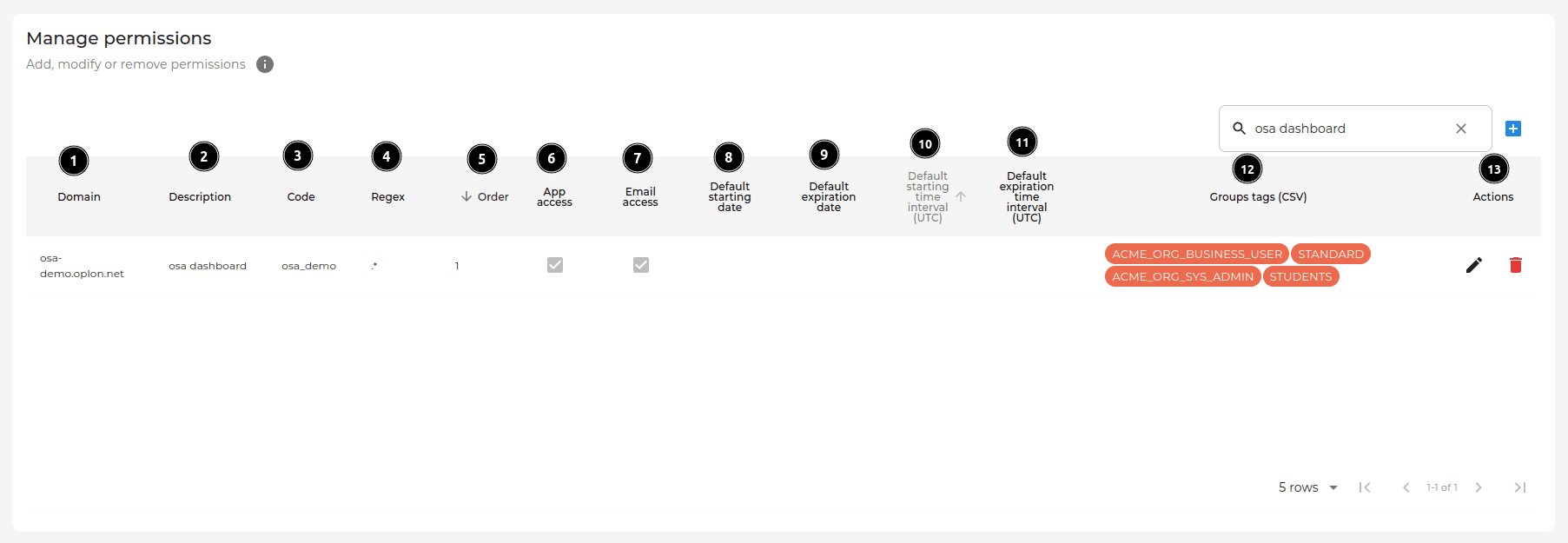
The permissions are the entities that declare which URLs (i.e. schema://domain/path),
among those managed by the manager, must be protected by MFA.
Permission management table legend:
- Domain: domain where the permission is applied
- Description: description of the rule
- Code: permission code; it must be explanatory and meaningful so that it is also clear to the user
- Regex: regular expression of the permission
The same regex must be applied on Oplon ADC by customizing the rewrite header rule 2faGeneric.
- Order: order of execution of the permission. The order of execution is a natural number.
Higher numbers identify priority in the execution of regexes.
For example, with two permissions, one with regex
.*and the other with regex/test, the first permission.*contains the second/test. For this reason, without a correct order of the regexes, the rule will continue to trigger.*also for/test. If, on the other hand, the execution order is indicated correctly, that is, execution order 1 is assigned to.*and execution order 2 to/test, the permissions will trigger correctly: for a path/test, only the permission with regex/testand the permission with regex.*will trigger. - App access: if the flag is
true, it enables access via app - Email access: if the flag is
true, it enables access via email - Default starting date: default start of the permission, before which it is not active (can be overridden)
- Default expiration date: default expiration of the permission, after which it will no longer be active (can be overridden)
- Default starting time interval (UTC): start time (e.g. 9am) (can be overridden)
- Default expiration time interval (UTC): expiration time (e.g. 8pm) (can be overridden)
- Groups tags (CSV): it is a declarative field that allows you to send information to the protected application (endpoint application). It is a CSV field; it can be populated with strings separated by commas.
- Actions: edit or delete
Management of permission requests
In this table the manager can perform actions on user permission requests.
Manage permission requests:
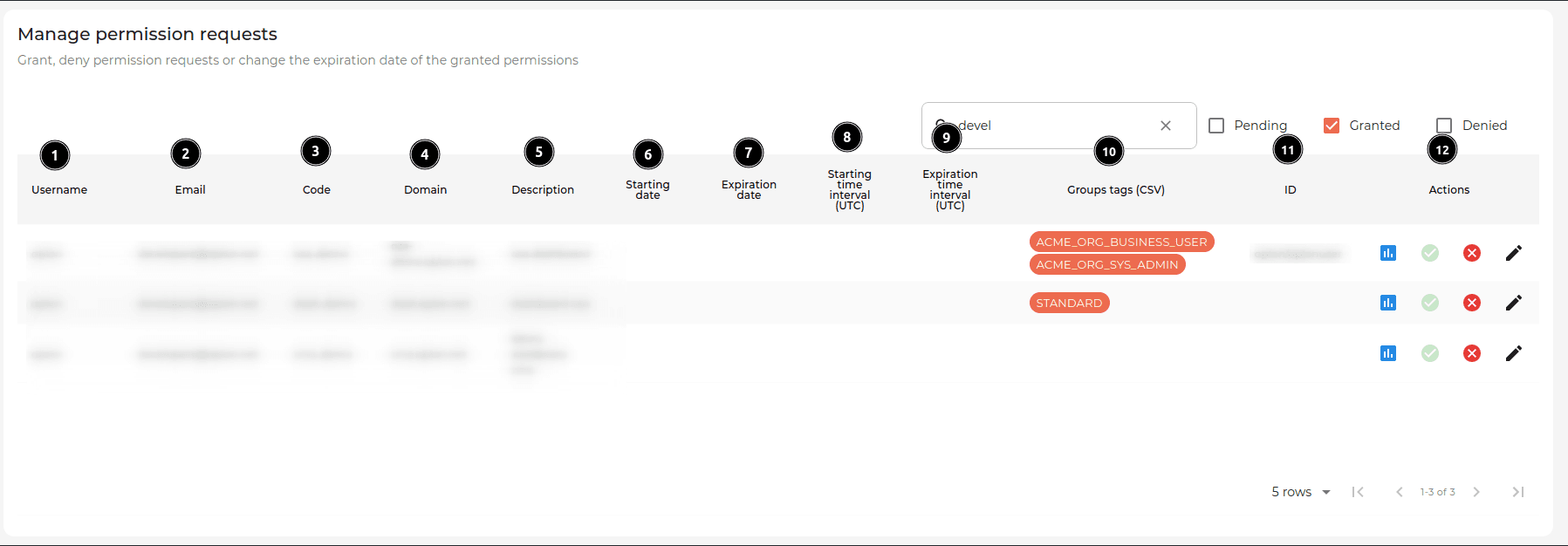
Permission requests can be found in this table:
- Pending: awaiting an action by the manager
- Granted: accepted by the manager
- Denied: rejected by the manager
In Granted permission requests, you can modify the permission request by entering:
- Username: username of the user requesting the permission
- Email: email used to request the permission
- Code: permission code; it must be explanatory and meaningful so that it is also clear to the user (inherited from permission)
- Domain: domain where the permission is applied (inherited from permission)
- Description: description of the rule (inherited from permission)
- Starting date: start of the permission, before which it is not active (overrides the default)
- Expiration date: expiration of the permission, after which it will no longer be active (overrides the default)
- Starting time interval (UTC): start time (e.g. 9am) (overrides the default)
- Expiration time interval (UTC): expiration time (e.g. 8pm) (overrides the default)
- Groups tags (CSV): in this field you can insert, through multiple selection, some or all of the Groups tags declared in the permission in the Manage permissions table
- ID (impersonation): it is a declarative field that allows you to send information
to the application protected by MFA (endpoint application). It is effectively a free CSV field, which can be populated as follows:
Impersonification1(single global impersonation)Group1::Impersonification1,Group2::Impersonification2,...,GroupN::ImpersonificationN, ImpersonificationX(impersonation per group + global impersonation)
- Actions: grant, refuse or edit a permission request